
A Virtual Data Room (VDR) is a secure online space for managing sensitive documents, especially during M&A transactions. A well-organized VDR saves time, boosts buyer confidence, and minimizes risks tied to human error, which accounts for 85% of data breaches. Poor organization can delay deals by 3–6 weeks and reduce investor confidence by up to 25%. Here’s how to set up your VDR effectively:
- Folder Structure: Use a clear hierarchy (e.g., Corporate, Financials, Legal) with 2–3 levels max. Number folders (e.g.,
01_Corporate) for consistency. - File Naming: Follow a format like
YYYY-MM-DD_Type_Description_v1.pdffor clarity. - Access Controls: Assign role-based permissions (e.g., View Only for buyers) and enable features like two-factor authentication and dynamic watermarking.
- Analytics: Track user activity to understand buyer priorities and improve content.
- Regular Updates: Replace outdated files, archive old versions, and keep documents current.
A tidy VDR not only streamlines due diligence but also demonstrates preparedness, which is crucial as regulatory scrutiny increases through 2027.
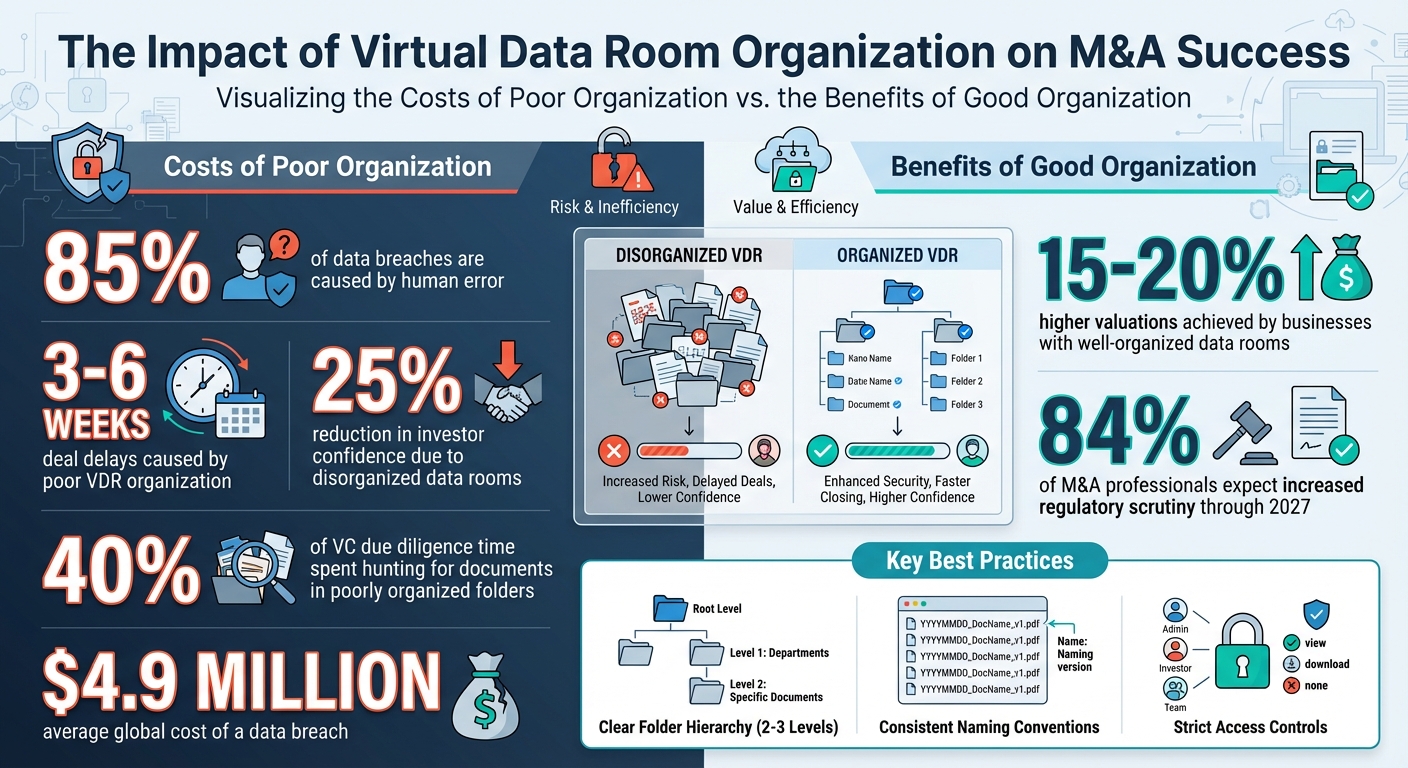
Virtual Data Room Organization: Key Statistics and Impact on M&A Deals
How to set up a virtual data room (Universal template)
How to Structure Your Virtual Data Room
A well-organized virtual data room (VDR) helps buyers focus on evaluating your business rather than wasting time searching for documents. Poorly structured data rooms can delay deals by 3 to 6 weeks and lower investor confidence by as much as 25%. In fact, venture capitalists spend nearly 40% of their due diligence time hunting for documents in poorly organized folders. Research from PwC also reveals that businesses with well-organized data rooms often achieve valuations that are 15% to 20% higher.
Here’s how you can structure your VDR for optimal efficiency.
Create a Clear Folder Hierarchy
Start by designing a logical folder layout to simplify document access. Before uploading anything, map out your folder structure with input from your legal, finance, and IT teams. This ensures everyone agrees on where documents belong and which areas require stricter security.
Your hierarchy should follow three levels: top-tier folders for broad categories (e.g., Corporate or Financials), main folders for specific workstreams, and subfolders for detailed document types. Keep it simple – limit the structure to 2 to 3 levels deep. If users have to dig through five or six layers to find a tax return, frustration is inevitable.
To make navigation even smoother, use numbered prefixes (e.g., 01_Corporate, 02_Financials) and underscores instead of spaces. This ensures the folder order remains consistent across devices, whether users are on a Mac, PC, or mobile.
| Top-Level Folder | Example Subfolders |
|---|---|
| 01_Corporate | Formation docs, Board minutes, Org charts, Bylaws |
| 02_Financials | Audits, Tax returns, Projections, P&L statements |
| 03_Legal | Material contracts, Litigation records, Regulatory filings |
| 04_IP | Patents, Trademarks, IP assignments, Software licenses |
| 05_HR | Employment agreements, Org chart, Benefit plans, Resumes |
| 06_Commercial | Customer lists, Sales pipeline, Marketing strategy |
Additionally, create two specialized folders from the outset: one for initial documents (e.g., NDAs, teasers, pitch decks) that buyers can access early, and another restricted folder for highly sensitive information like employee salaries or specific customer pricing. This phased approach helps you control what buyers see at different stages of the deal.
Use Standard Naming Conventions
"Establishing a consistent naming convention for your files and folders may be the most important investment of time you can make before uploading those files to your virtual data room (VDR) workspace." – Trace Gordon, CapLinked
Adopt a consistent file-naming format to keep everything organized. A recommended structure is: YYYY-MM-DD_DocumentType_Description_Version.ext. Using ISO date format (e.g., 2025-01-24) ensures files sort chronologically without manual effort. Stick to underscores instead of spaces, as spaces can get replaced with "%20" in some systems, disrupting search functionality and appearing unprofessional.
Include version tags like _v1, _v2, or _v3 for drafts, and reserve labels like _FINAL or _EXECUTED for completed or signed documents. Avoid vague names like "Document1" or "Meeting_Notes" – these create confusion. For example, a file named 2025-01-24_Tax_Returns_Delaware_v1.pdf is clear and precise, while Final_Version_New.docx leaves users guessing.
Once your naming conventions are in place, double-check that all required documents are uploaded.
Build a Due Diligence Checklist
A thorough checklist ensures you’ve covered all critical document categories. Common categories include: Corporate & Cap Table, Financials & KPIs, Tax, Legal & Contracts, Customers & Revenue, HR & Payroll, IP & Technology, Security & Privacy, Product & Operations, Regulatory & Compliance, Litigation, Insurance, and Real Estate. Tailor this list to your industry – for example, Biotech companies may need clinical trial data, while Software companies might include API documentation and source code folders.
"A good room is not the one with the most files; it is the one where a buyer can form a clear, defensible view of the business without getting lost." – Peony Blog
Upload only final, approved versions of documents. Before launching the VDR, ask someone uninvolved in its preparation to navigate it. If they struggle to locate key files, potential buyers will too. Eliminate redundant files, temporary office files, and thumbnail caches – these extras can make your VDR appear cluttered and unprofessional.
Set Up Permissions and Access Control
Once you’ve organized your folder structure and established clear naming conventions, the next step is controlling who can access your documents. Tightening access permissions is a crucial part of building a secure and efficient Virtual Data Room (VDR) for managing deals.
Assign Role-Based Permissions
Start by categorizing users into distinct roles before granting them access. Common roles include Administrators (full control over settings and content), Viewers (read-only access), and Editors (can modify or upload documents). Assign these roles to groups such as Legal Advisors or Potential Buyers to streamline management and minimize errors during the deal process.
Stick to the Principle of Least Privilege, ensuring users only have the access they need to perform their specific tasks. For instance, external buyers often only require view-only access to financials and contracts during early due diligence, while your internal finance team might need full editing and download capabilities. Use granular controls at the folder or document level to restrict actions like printing, downloading, or screen capturing as needed.
| Role | Access Level | Typical Folders/Documents |
|---|---|---|
| Internal Legal Team | View / Edit / Download | All folders, including corporate and regulatory |
| Finance Team | View / Edit | Financials, tax returns, forecasts, debt schedules |
| Executive Team | View Only | Key corporate and strategic documents |
| External Buyer | View Only | Financials, contracts, HR (limited) |
| Legal Advisors | View / Download | Legal, regulatory, and compliance workstreams |
| IT / Security Admins | Admin / Manage | Settings and permissions (often no content access) |
To further secure access, set expiration dates for external users like potential buyers, ensuring their permissions automatically expire after a specific milestone or time frame. For high-stakes transactions, you can also restrict access to specific IP addresses or geographic locations, adding another layer of security. Always test permissions using the "View As" feature to confirm that each role is configured correctly.
Once roles are set, you can enhance security by enabling advanced features designed to protect sensitive information.
Enable Security Features
Basic permissions alone aren’t enough to safeguard confidential documents. Activate advanced security measures to take your VDR’s protection to the next level. One essential step is enabling two-factor authentication (2FA) for all users, especially those with administrative or executive access.
"Relying on just passwords creates a single point of failure." – Ori Eldarov
With 2FA, users must verify their identity through a second method, like a smartphone code, significantly reducing the risk of unauthorized access even if passwords are compromised.
Another effective tool is dynamic watermarking, which discourages unauthorized sharing by embedding identifying details – such as the viewer’s email address, IP address, and timestamp – on every page of a document.
"Watermarking helps protect proprietary data or other sensitive information by linking the file with the person who accessed it." – Matt Eidem, Onehub
This feature provides a clear trail to trace the source of any leaks.
Enable session timeouts to automatically log users out after inactivity, reducing the risk of unauthorized access from unattended devices. For highly sensitive documents, consider activating Fence View, a feature that masks the screen and only reveals the portion of the document near the cursor, preventing screenshots. Some VDRs even offer remote shredding, which allows administrators to revoke access to files after they’ve been downloaded.
Finally, ensure that audit trails are always active. These logs provide a tamper-proof record of who accessed which documents, when, and for how long. Audit trails are invaluable for maintaining accountability, meeting regulatory requirements, and protecting your organization in case of disputes during or after the transaction.
Use Analytics to Improve Deal Strategy
Once your Virtual Data Room (VDR) is secure and well-organized, analytics can take your deal strategy to the next level. Modern VDRs capture every interaction – tracking who opens files, how long they spend on each page, and which documents get downloaded or printed. These insights provide a window into what matters most to potential buyers and where their concerns might lie.
Track Document Views and User Activity
Pay attention to which documents generate the most interest. For example, if buyers are diving into your financial forecasts or debt schedules, it’s a clear signal that these areas are central to their decision-making process. Metrics like time spent per page can distinguish between a casual glance and a deep dive into critical details. If a buyer repeatedly accesses a specific litigation folder or spends extended time reviewing sections of a contract, they may be evaluating deal-breaking details.
Comparing activity across different bidders can also reveal key insights. For instance, if one buyer logs in multiple times in a week while another hasn’t accessed the VDR in over a week, it’s clear where your team should focus its energy. Organizations with advanced monitoring capabilities not only detect data breaches faster but also pinpoint the most engaged buyers more effectively.
"Data room document analytics surfaces behavioral patterns. Specifically, the software can highlight unusually frequent views of sensitive documents, time spent per page, or comparative interest across bidders." – Editorial Team, data-rooms.org
Set up real-time alerts for activity in sensitive folders, such as intellectual property or regulatory filings. These alerts enable your team to respond quickly with follow-up calls or additional information while interest is still fresh. By leveraging these insights, you can optimize how your VDR content is structured and presented.
Adjust Content Based on Data
Analytics reports provide a roadmap for improving your VDR content. If users spend excessive time in a folder or repeatedly download outdated files, it’s a sign that section needs attention. Consider uploading updated versions, FAQs, or clarifying documents to address potential confusion before it becomes a problem.
When legal or HR sections attract disproportionate attention, it might be worth adding extra context or explanatory notes. Similarly, if buyers are submitting Q&A requests about topics already covered, it’s a red flag that your folder structure or naming conventions might need tweaking. Use these patterns to reorganize your VDR, making key information easier to locate. A consistent structure not only simplifies navigation for buyers but also makes your analytics more actionable.
| Analytics Feature | Data Captured | Strategic Benefit |
|---|---|---|
| Document Views | Which files were opened and by whom | Highlights buyer priorities and key areas of focus |
| Time Spent per Page | Duration of focus on specific sections | Indicates depth of interest or potential confusion |
| User Activity Logs | Actions like viewing, downloading, printing | Provides a complete audit trail and engagement metrics |
| Comparative Interest | Activity levels across bidder groups | Helps identify and prioritize the most engaged buyers |
Assign a VDR owner to oversee access logs and ensure updates are made based on analytics insights. This person should flag issues like failed login attempts, unusual download activity, or multiple users accessing a problematic file. Regular, data-driven adjustments not only keep your data room efficient but also make it easier for buyers to navigate and engage with confidence.
sbb-itb-798d089
Keep Your Virtual Data Room Current
Keeping your Virtual Data Room (VDR) up-to-date is essential for maintaining accuracy and professionalism throughout the M&A process. Letting outdated drafts or placeholder files linger can waste buyers’ time and harm your credibility. As the deal moves forward, new financial statements come in, contracts are finalized, and buyer inquiries arise. If old or placeholder files remain accessible, buyers might review incorrect information, which could undermine trust in your organization.
Beyond having a solid structure and security, regular maintenance ensures your VDR stays effective and reliable. Here’s a closer look at two key practices: scheduling regular updates and removing unnecessary files.
Schedule Regular Reviews and Updates
Assign a dedicated VDR manager to oversee updates, manage permissions, and handle document requests. Set a consistent update schedule to replace outdated drafts promptly. For example, once Q1 2024 financials are finalized, upload them as P&LStatement_2024Q1_v2.pdf to ensure buyers see the latest version.
"Establish a content update schedule and stick to it. In order to be accurate and not misleading, information should not be outdated, especially financial records." – Trenam News
Review access logs weekly and monitor Q&A interactions to identify any missing information or unresolved questions. Close out folders for completed items to keep the workspace streamlined and focused.
Remove Old or Unnecessary Files
In addition to regular updates, actively clear out outdated files. Store older versions in a clearly labeled archive folder, such as "Old", "Previous", or "Superseded", to avoid confusion. Clearly mark the latest documents as "Final" or "Current" to distinguish them from drafts. Before uploading new files, clean up items like thumbnail caches and placeholder files to maintain a polished and professional folder structure.
| Maintenance Task | Frequency/Trigger | Purpose |
|---|---|---|
| Replace Drafts | Upon finalization | Ensures buyers see only finalized, binding documents |
| Audit Access Logs | Weekly/Ongoing | Detects unusual activity or outdated file interest |
| Archive Superseded Docs | Upon version update | Prevents version control issues and user confusion |
| Remove Placeholders | Post-upload audit | Keeps folder structure clean and professional |
| Update Financials | Per schedule | Ensures compliance and accurate valuation |
A well-maintained VDR not only accelerates due diligence but also demonstrates your organization’s transparency and preparedness. With 84% of M&A professionals anticipating tighter regulatory scrutiny in the next two years, maintaining an accurate and compliant data room is more important than ever.
Connect Your VDR with Other M&A Tools
Integrating your Virtual Data Room (VDR) with other M&A tools can save time, reduce errors, and streamline your deal process. By connecting these tools, you can eliminate manual data entry, avoid versioning mistakes, and ensure your transaction moves forward efficiently. This approach builds on the organized structure already in place, creating a smooth transition from document preparation to deal execution.
Work with Professional Service Providers
A well-structured VDR works best when aligned with expert-created deal materials. Collaborate with your deal preparation team to ensure your VDR setup matches the structure of critical documents like the Confidential Information Memorandum (CIM) or Offering Memorandum (OM). For example, if you’re using a service like Deal Memo to produce your CIM within 72 hours, make sure it fits seamlessly into pre-arranged VDR folders – such as "Financials", "Corporate", or "Operations" – without needing additional formatting or adjustments.
To ensure a smooth setup, create a visual schema with your legal, finance, and document teams. This schema should define security boundaries and document locations. For instance, if your CIM outlines three revenue streams, create subfolders under "Financials" that match those categories. This way, buyers can quickly find the documents they need without confusion.
Finally, make sure your VDR structure aligns with your internal team’s workflows to maintain efficiency throughout the process.
Align VDR Structure with Team Workflows
Your VDR’s folder structure should reflect your team’s specific responsibilities. For example, if your finance team handles audits and projections while your legal team manages contracts and compliance, organize top-level folders like "Financials" and "Legal" to match these workstreams. This setup allows for role-based permissions, ensuring team members access only what they need, minimizing errors, and simplifying management.
Modern VDRs also come with built-in Q&A workflows that eliminate the need for fragmented email threads. Questions can be automatically routed by category – tax inquiries to tax advisors, IP questions to legal counsel – with defined roles for authors, reviewers, and approvers. Additionally, integrating e-signature platforms into your VDR allows you to move directly from document review to execution, a critical feature as 84% of M&A professionals anticipate heightened regulatory scrutiny in the coming years.
| Integration Tool Type | Benefit to M&A Workflow | Key Features |
|---|---|---|
| CRM Systems | Simplifies pipeline management | Syncs bidder contact info and tracks engagement levels |
| E-Signature Platforms | Speeds up deal closing | Enables secure signing of NDAs and contracts directly within the VDR |
| Deal Management Software | Enhances team coordination | Streamlines diligence tasks and collaboration |
| AI Analysis Tools | Cuts down review time | Automates redaction, document sorting, and contract tagging |
To keep everything running smoothly, assign two administrators to manage updates and permissions.
Conclusion
A well-organized Virtual Data Room (VDR) serves as more than just a digital filing cabinet – it becomes a powerful tool to speed up deals and earn buyer confidence. By using clear folder structures, consistent naming conventions, role-based access, and regular upkeep, you create a space where due diligence can proceed smoothly and efficiently.
With the average global data breach costing $4.9 million and human error contributing to 85% of those breaches, a well-structured VDR not only reduces delays but also safeguards the value of your deal.
"A well-organized M&A data room shortens due diligence timelines, prevents costly errors, protects confidential information, and shows potential buyers you’re prepared." – Editorial Team, data-rooms.org
These benefits highlight why ongoing VDR management is so critical. Your VDR reflects your company’s readiness and professionalism, which can directly impact buyer trust and competitive bidding. As 84% of M&A professionals expect regulatory scrutiny to increase by 2027, having compliance-ready documentation is more important than ever.
Start by designing a logical folder structure, assigning a dedicated VDR manager, and ensuring the VDR integrates seamlessly with your team’s processes. These steps lay the groundwork for a successful deal, from the first buyer login to the final handshake.
FAQs
How can I keep my virtual data room (VDR) secure from unauthorized access?
To keep your virtual data room (VDR) secure from unauthorized access, start by selecting a provider that uses strong encryption standards, such as AES-256, to protect your data both during transfer and while stored. Implement granular user access controls to assign permissions tailored to each user’s role, ensuring they only see what they need.
Enable multi-factor authentication (MFA) for an added layer of security, requiring users to verify their identity through multiple steps. Make it a habit to monitor audit logs to keep an eye on user activity and quickly spot any unusual behavior. Additionally, perform regular security updates and vulnerability assessments to address any potential threats proactively.
By following these steps, you can establish a secure space for managing your sensitive information.
What are the advantages of using analytics in a virtual data room?
Using analytics in a virtual data room (VDR) offers insights that can streamline processes, bolster security, and improve decision-making during a deal. For instance, analytics let you monitor user activity – like who accessed specific files, when they did, and how long they spent on them. This level of detail helps you spot engagement patterns and flag potential issues early on, ensuring smoother compliance and a more efficient due diligence process.
Analytics also reveal which documents get the most attention, guiding dealmakers to prioritize key information or address any missing data. With this knowledge, you can refine how documents are organized, adjust user access permissions, and tighten security protocols. In short, analytics bring greater clarity and control to the VDR, helping to simplify management and speed up transaction timelines.
How often should I update documents in a virtual data room?
Keeping the documents in your virtual data room (VDR) updated is essential to ensure that everyone involved has access to the latest and most accurate information. These updates should coincide with major milestones in the deal process – like after financial reviews, legal evaluations, or the release of new data.
A well-maintained VDR not only simplifies decision-making but also minimizes misunderstandings and reinforces trust among all parties working on the transaction.